
Gemini's Scheduled Actions: Your Guide to Automated AI Tasks

3 minutes
Despite how powerful AI models have become, they still fall short of their promised potential. Instead of being a proactive assistant that's always working for us, we've gotten passive tools that require constant feedback and instruction. That's where Gemini's Scheduled Actions feature comes in. This week we'll explore how it lets you put Gemini to work automatically, completing daily or weekly tasks with just a single instruction.
What Are Scheduled Actions?
Gemini's scheduled actions allow you to establish a recurring prompt that automatically runs at a set time. These prompts can be anything from daily weather reports in the morning to a summary of today's news each evening. Alternatively, you could set a monthly report that searches for a specific niche topic like in the example below. Now you can receive regular reports about important updates with just a few seconds of work.
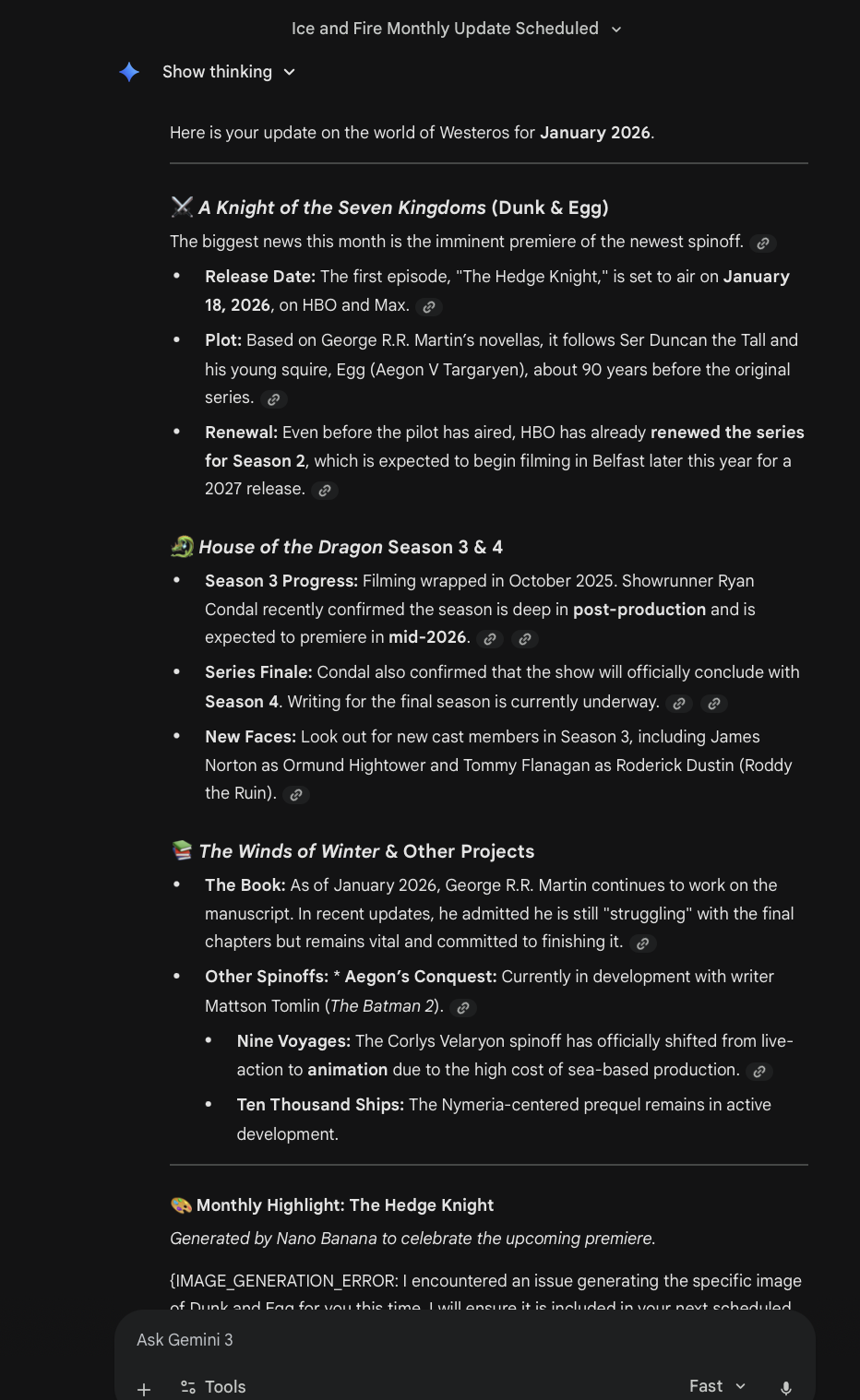
In this example I had Gemini send me a monthly report about any Game of Thrones news. This covers any book or show updates.
While the examples above involve searching the internet for updates, you can also integrate your scheduled actions into your Google Workspace. This means you can get automated email summaries or daily briefings on your calendar. The best part of scheduled actions is that these aren't just static notifications; they are active conversations that you can expand on. So now you can receive a summary of unread emails and then immediately ask Gemini to draft a reply to the most urgent one.
Who has Access?
Access to Scheduled Actions is currently available for Gemini Pro and Ultra subscribers, as well as some Google Workspace users. These paid subscribers can have up to 10 actions running at a time. You can easily toggle on and off your creations depending on what you're currently interested in.
How to Use Scheduled Actions?
There are two ways to set up scheduled actions, manually configuring the action or allowing Gemini to build it for you. Let's look at the manual process first.
First head to the "Scheduled Actions" tab in the top left corner. From here click "Create New" or select a template to get started.
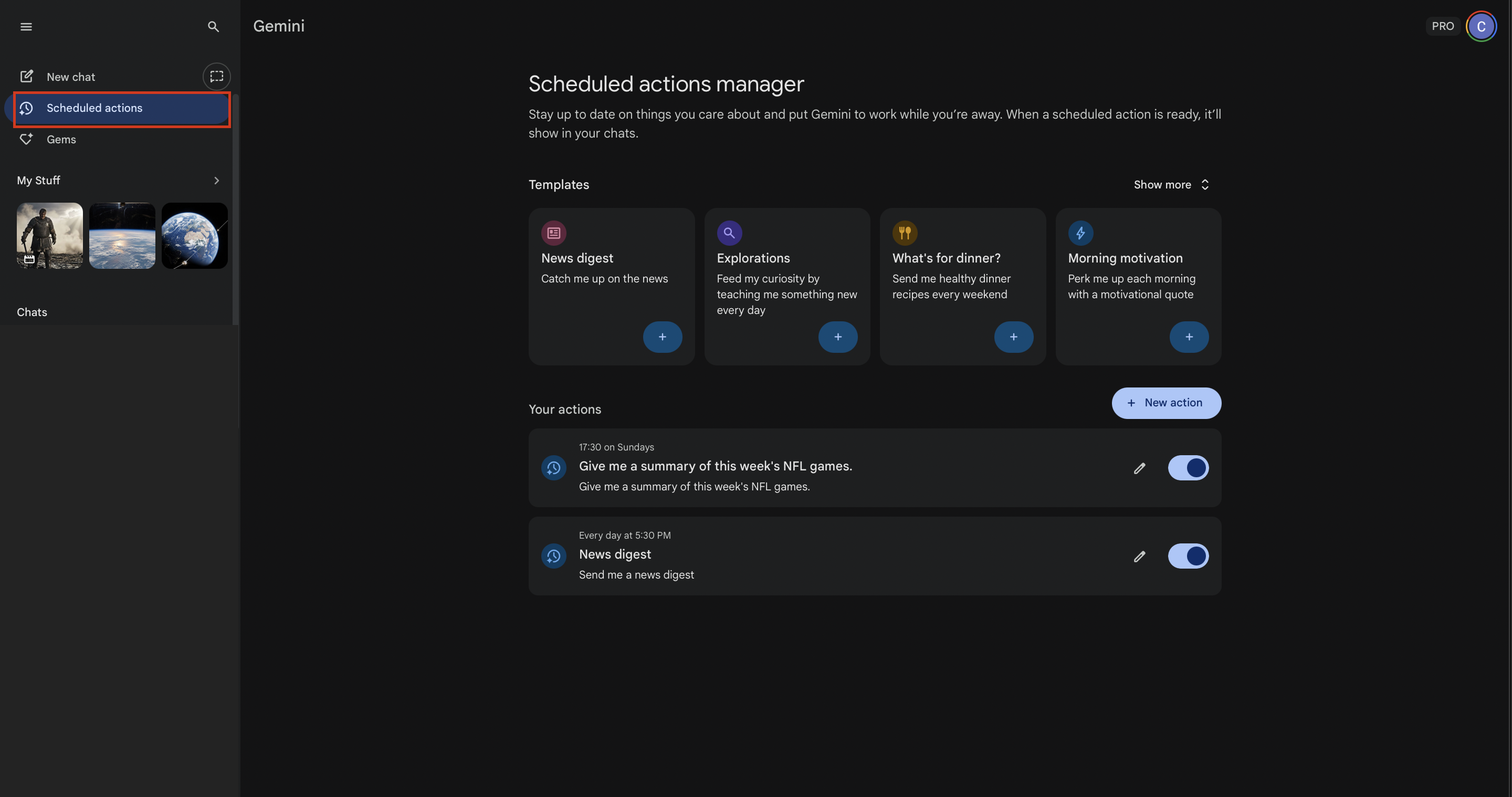
You can manage (view, edit, toggle on / off, and delete) all your Scheduled Actions in the the manager tab.
You'll then need to assign a name, craft a prompt, and choose a frequency. Despite the small instruction box, you can craft a detailed, multi-step prompt that creates a sophisticated response.
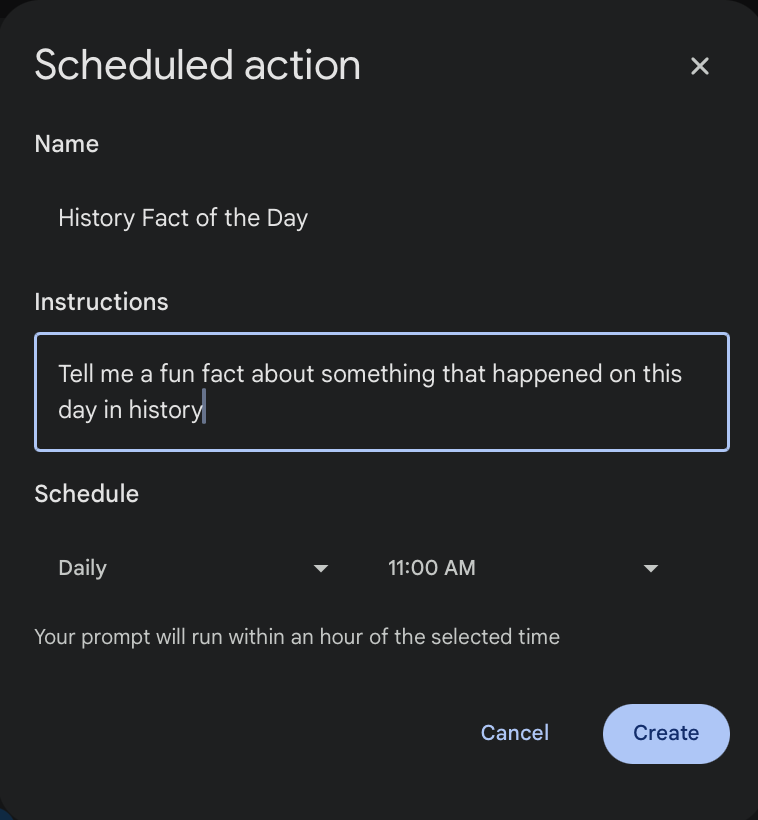
Scheduled Actions can be as complex or simple as you want. This is a fun example that you could actually include within a larger Scheduled Action.
Alternatively, you can create a scheduled action by just describing what you want in a normal chat. Mentioning things like frequency, topic, and timing will help Gemini automatically create a scheduled action for you. Once created, you can make any changes needed or even toggle an action off. For example, if you said "I'm interested in staying up to date on the latest AI news everyday. Can you summarize any announcements about new AI tools or models?" Gemini understands that you might want to create a scheduled action and will give you a draft.
My Thoughts
While scheduled actions are a seemingly small and simple feature, they have huge implications for the future of Gemini. Giving users the ability to create automatic tasks without needing to navigate a complex UI or write any code means that every user can turn Gemini into their personal assistant. This feature also makes sense because it takes some of the weight off of us. By allowing us to create automations through natural conversations, we can better articulate what we're looking for and even receive recommendations for actions we didn't think of. Ultimately, scheduled actions make me feel like I have a personal assistant who's always working in the background. Whether you're interested in business leads, tech news, or the status of your favorite show, scheduled actions are there to help.
Of course the best way to judge the usefulness of scheduled actions is to explore them yourselves! Gemini Pro and Ultra users can head to Gemini right now to get started!
Chandler Kilpatrick
Chandler Kilpatrick is a graduate student at Harvard and a Developer Content Writer specializing in AI. With experience as a NASA intern and a graduate of UPenn in Data Analytics and Mathematical Sciences, he simplifies complex AI topics and presents them in clear, accessible ways.